Hi, I’m Remy Lambert and this is a short DevBlog of my physics engine called Miaou Engine which I made during my games programming formation at the SAE School.
What’s the goal of the Engine ?
Main Goal :
- Recap of linear algebra
- Understand the basics of physics
- Use Tracy to track the performance of our code
- Understand where and how to optimise code
Availble Demo Scene
Planets Scene

The yellow star in the centre represents the sun, the other points are the planets.
Trigger Scene

Here objects will change colour depending on whether they overlap or not. Red means they do not overlap and green means they do.
Collision Scene

Collision response mean that Circles adapt their velocity after the contact with an other Circles.
Also two circles that collide will take on the same new color.
Collision between Circle and Rectangle Scene

Scene is showcasing the interaction between different entities shapes.
Two objects that collide will take on the same new color.
Static Scene

Circles adapt their velocity into contact with the static Rectangle, Contact response is based on the collider restitution.
Contact Detection
Naive implementation
This was very costly as we were checking for collisions that were clearly impossible, for example if 2 elements were on opposite sides of the window.
What’s a QuadTree ?
The time complexity of the problem will go through O(n) -> Olog(n) with this method as we divided the space for possible collision.
To avoid a problem where an object can be in the 4 new quad, we put it in the root position.
We use this system in recursion to reduce the possible pair we want to find, we set a depth element to control the max subdivision in quad we want to have.
We used a simplified version of the collider to get information about the position of each collider in the world.
struct SimplifedCollider
    {
        Engine::ColliderRef colliderRef;
        Math::RectangleF aabb;
    };
A Node has an array of children, and a vector (AllocatedVector here for memory tracking, which we’ll see later) of the colliders present in the Node.
struct QuadNode
  {
      ...
      std::array<QuadNode*, 4> children{nullptr, nullptr, nullptr, nullptr};
      AllocatedVector<SimplifedCollider> colliders{};
      ...
  };
The tree has a node vector and a possible pair vector which is filled in after the tree is created during the frame.Then the nodes are traversed to determine whether colliders can collide.
There is also a limit to the number of colliders possible in a node before it is subdivided, as well as a limit to the depth, meaning the number of sudivisions possible from node 0, which we call root.
~~~~~~~~~~~~~~~~~~~~~~~~~~~~~~~~~
class QuadTree
  {
      ...
      AllocatedVector<QuadNode> nodes{StandardAllocator<QuadNode>{heapAllocator}};
      AllocatedVector <ColliderPair> nodeColliderPairs{
              StandardAllocator <ColliderPair > {heapAllocator}};

      static const auto MaxColliderInNode = 4;
      static const auto MaxDepth = 6;
      ...
    };
~~~~~~~~~~~~~~~~~~~~~~~~~~~~~~~~~
Frame Analysis
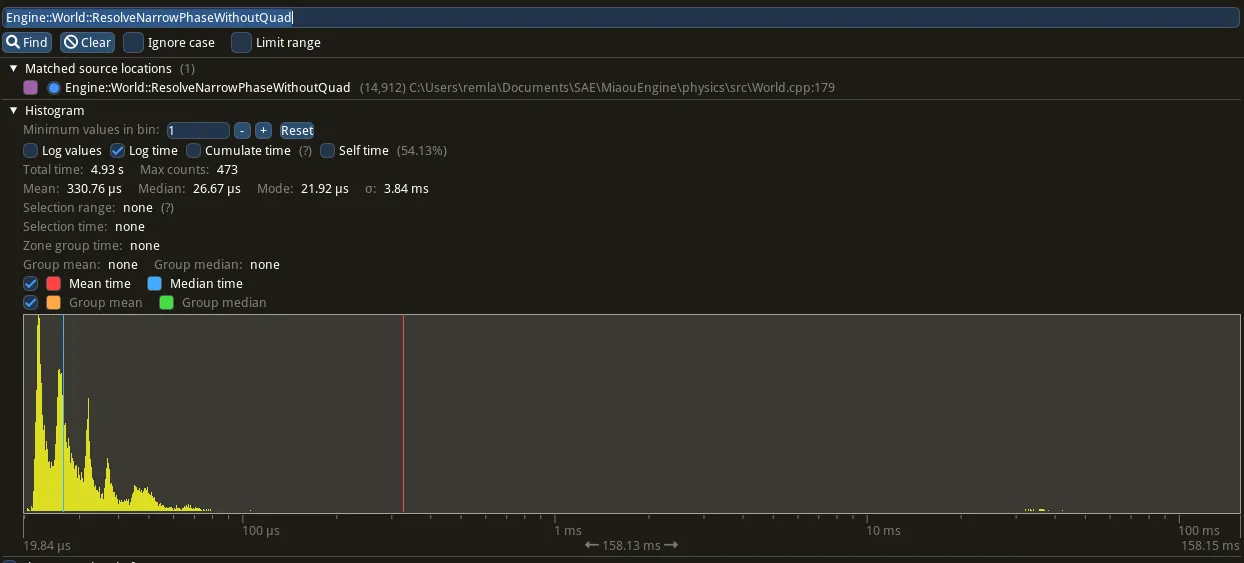
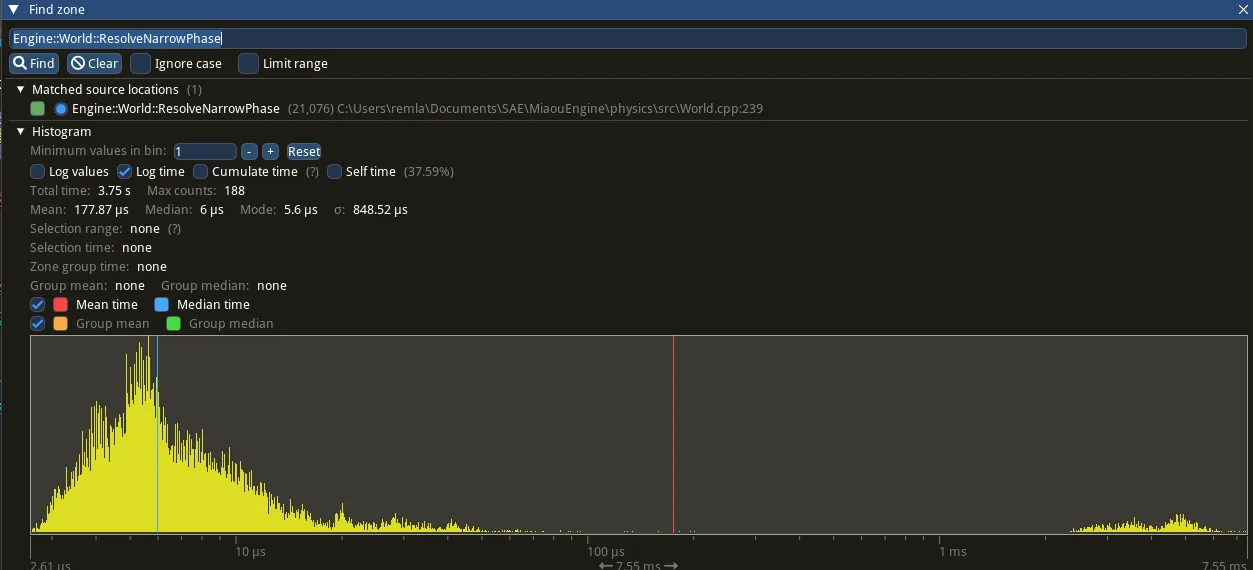
Tracy already gives us the mean, median and standard deviation of the target function.
Here we’ve taken the part where we calculate the possible pairs with the quadtree created earlier.
I’ve chosen this section rather than the whole Update part, to highlight the area of the code we’re trying to optimise.
You can see that all the stats have been reduced.
I also ran a t-test to look more closely at the statistics for this part of the optimisation.
For a total of 200 elements for each population we got :
| ResolveNarrowPhase | WithoutQuadTree | WithQuadTree |
|---|---|---|
| Mean (ns) | 36852,34171 | 10541,89447 |
| Variance (ns) | 134053595 | 27894466,13 |
Note : We can see variation between this mean and the one in the tracy screen because i used a different record for both.
For the T-test we need to see if our P(T <= t) two-tail is lower than our p set at 5%
| ResolveNarrowPhase | |
|---|---|
| P(T<=t) two-tail | 2,76668853343804E-86 |
| t Critical two-tail | 1,96859628388271 |
As this is true we can calculate some new stats that show our optimisation with the test
| ResolveNarrowPhase | |
|---|---|
| MeanDifference (ns) | 26310,44724 |
| StandardError (ns) | 902,1138246 |
| ErrorMargin (ns) | 1775,897923 |
| ResolveNarrowPhase : Limit Confidence | |
|---|---|
| LowerLimit (ns) | 24534,54931 |
| Greater Limit (ns) | 27212,56106 |
Mean difference represents the time in average that we gain each frame with this optimisation.
Memory Problem ?
Memory Leak
A quick aside on an huge error I made.
When I implemented my quad tree I used this array of ptr in the quad node struct.
In the Subdivide function I used to call new operator in order to create the children of
each node.
    struct QuadNode
        {
            ...
              std::array<QuadNode*, 4> children{};
            ...
            void Subdivide();
        };
    void Subdivide()
    {
      ...
          children[0] = new QuadNode(Math::RectangleF(leftMiddle, topMiddle));;
          children[1] = new QuadNode(Math::RectangleF(center, topRightCorner));;
          children[2] = new QuadNode(Math::RectangleF(bottomLeftCorner, center));;
          children[3] = new QuadNode(Math::RectangleF(bottomMiddle, rightMiddle));;
    }
As I don’t delete the ptr I create a huge Memory Leak :
 Programme memory used at start
 Programme memory after 10s
Every frame I called up a new operator, which is why the memory kept growing.
Programme memory after 10s
Every frame I called up a new operator, which is why the memory kept growing.
I first fixed it with a single ptr.
Memory Tracking
For the part where we create the children of the nodes, I opted for another solution inthe end.
Instead of allocating memory for children when we create a new node, I create all thepossible node, and so chlidren, in the first frame of the program using a simple functionthat calls
the depth limit that we created beforehand
           std::size_t maxChildrenPossible = 0;
          for(int i = 0; i <= MaxDepth; i++)
          {
              maxChildrenPossible += Math::Pow(4, i);
          }
          nodes.resize(maxChildrenPossible, QuadNode({heapAllocator}));
In Tracy that represents this memory pattern at the start of the program.
InitTreeMemory
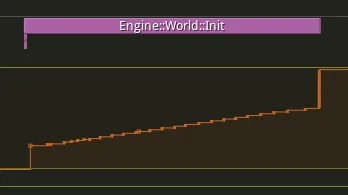 Unfortunately I forgot to take a screen of the update pattern without theallocation in the init, but the difference was that there were also allocationsfor the new nodes.
Now it looks like This :
UpdateMemory
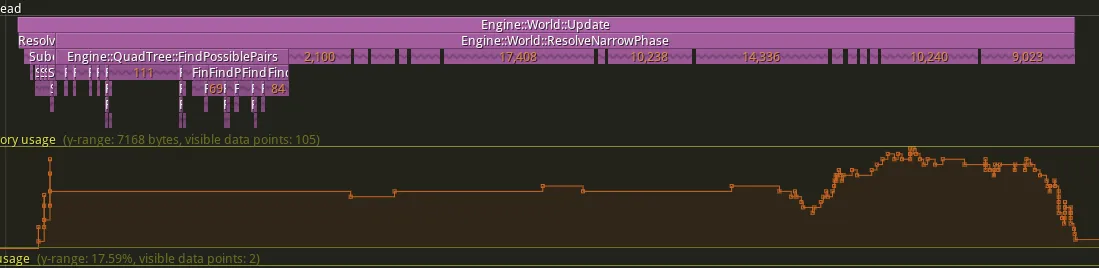 the allocations at the start of the frame are due to the colliders added to thecollider vectors of the nodes.
Allocations in the narrow phase represent movements between pairs that arecurrently in contact or not, and are stored in an unordered_set.
Pairs are added to the set if there is a collision and removed from it if thecollision has ended.
            //THIS IS PSEUDO-CODE TO MAKE IT EASIER TO READ.
              for (auto &pair: ColliderPairsFromQuadTree)
             {
                ...
                 const auto pairIterator = unordered_setOfColliderPairs.find(pair);
                 if (pairIterator !=  unordered_setOfColliderPairs.end())
                 {
                     if (IsContact(colliderA, colliderB))
                     {
                       ...
                         contact.Resolve();
                     }
                     else
                     {
                         OnTriggerExit Or OnCollisionExit
                         //HERE WE REMOVE A PAIR FROM THE unordered_set
                         unordered_setOfColliderPairs.erase(pairIterator);
                     }
                 }
                 else{
                     if(IsContact(colliderA, colliderB))
                     {
                        ...
                        contact.Resolve();
                        OnTriggerEnter Or OnCollisionEnter
                        //HERE WE ADD A PAIR IN THE unordered_set
                        unordered_setOfColliderPairs.insert(pair);
                     }
                 }
             }
Thank You
Thank you for reading,
and I hope you enjoy the Miaou Engine !