Introduction
The First-Time User Experience (FTUE) is a key element in any video game. It shapes the player’s first impression and influences their long-term engagement. For Ruby and the Lost Crystals, my goal was to design a smooth and natural introduction that allows new players to absorb the essential mechanics effortlessly, while maintaining immersion and the joy of discovery.
This blog post details my methodological approach to designing the FTUE, addressing the following steps:
- Defining the Vision – Identifying the Essential Mechanics and Structuring Progressive Learning while Expanding the Game’s Vision, Visual Intuitions, and Narrative Elements.
- Designing the Learning Level – Creating a guided path with intuitive level design.
- Implementing Help and Feedback – UI, dialogues, and visual effects to support understanding.
- Iterations and Improvements – Testing and validation phases to refine the experience.
Through the FTUE, I aimed to create an engaging introduction that promotes the learning of mechanics while minimizing player frustration with the more complex mechanics.
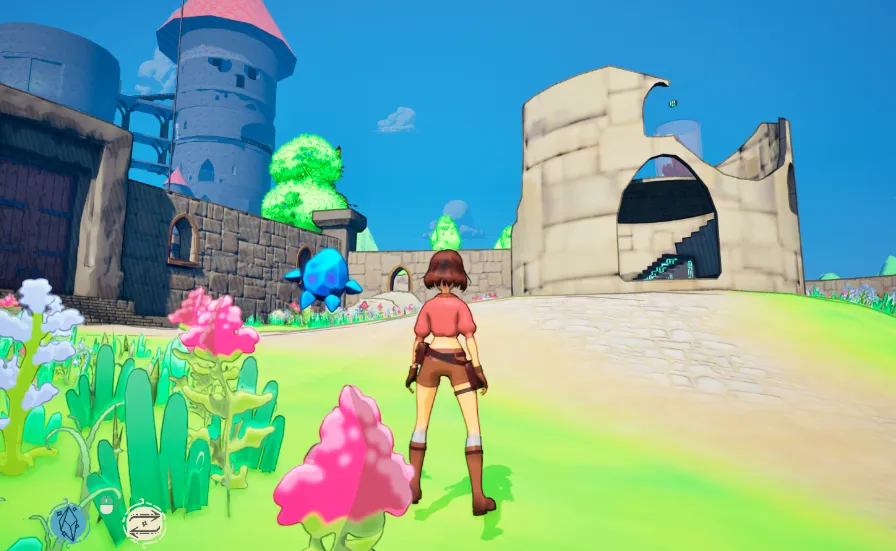
Screenshot of an area of the FTUE
What is a Proof of Concept and How It Shaped the FTUE
A Proof of Concept (PoC) is a preliminary version of a project created to test key ideas and validate the feasibility of a concept before moving into more in-depth development.
In the case of Ruby and the Lost Crystals, the PoC provided valuable insights into how players understood the gameplay mechanics without external assistance. Through playtests, we were able to observe which mechanics were the most difficult to grasp, allowing me to take an initial direction in the design of the First-Time User Experience (FTUE). In short, the FTUE was designed as a direct response to the feedback gathered during the PoC testing.
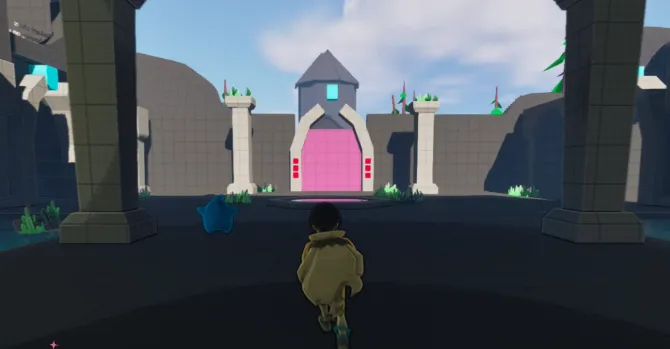
Screenshot of the PoC
Progressive Learning Path and Unreal Engine’s Landscape
Once the key elements of the gameplay loop were identified, as well as the recurring mechanics that needed to be understood by the player, I implemented a progressive learning path. This path was designed to introduce each mechanic one by one, ensuring that the player fully grasps each one before moving forward. Each stage of the level required the player to confirm their understanding of a key gameplay element before progressing.
To make the experience more enjoyable, I adopted a concept of ascension, where the player gradually climbs a path and can observe the future areas from above. This concept helps to reward the player through their knowledge gains, giving them a sense of gradual skill improvement. As they progress, they can also assess how far they’ve come in the tutorial, which strengthens their engagement and motivation.
To implement this ascension system, I had to learn and use Landscape in Unreal Engine.
What is Landscape in Unreal Engine?
Landscape is an integrated terrain tool in Unreal Engine that allows you to sculpt and shape natural environments like hills, mountains, plains, or valleys. Unlike a simple static plane, it offers much greater flexibility to design immersive levels and tailor their topography to suit the gameplay needs.
Why use Landscape for the FTUE?
- Naturally guide the player – By sculpting the terrain, I was able to direct the player toward important objectives through path brush shapes and different materials.
- Create a progressive ascent – The player’s ascent becomes physical, reinforcing their sense of learning and progression.
- Give depth to the tutorial – Instead of a flat and monotonous terrain, Landscape helps provide a more engaging experience that feels closer to the final game world.
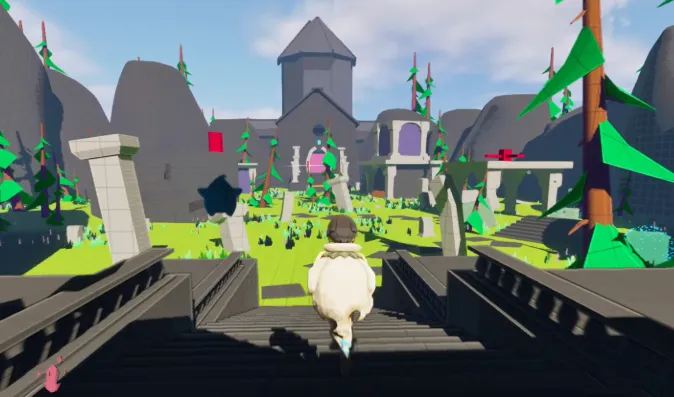
Open zone in the PoC using a plane
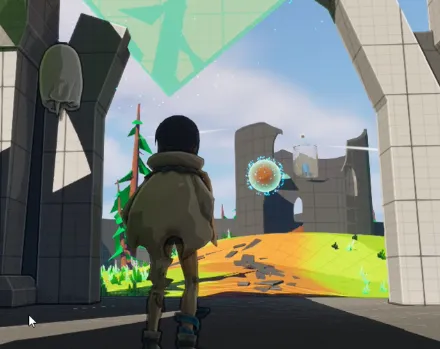
Open zone in the FTUE using Landscape
Use of Modeling Tools in Unreal Engine
To define the FTUE level, I had to create 3D assets using Unreal Engine’s Modeling Tools. The Modeling Tools Editor Mode is a set of 3D modeling tools integrated directly into Unreal Engine. It allows you to create, edit, and modify 3D shapes non-destructively, without the need for external software like Blender or Maya. This is particularly useful for quickly prototyping environments and testing ideas directly within the engine.
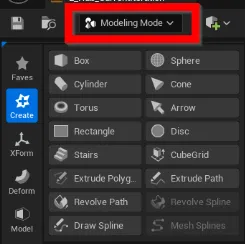
Modeling tools in Unreal Editor
Why use it for the FTUE?
I used the Modeling Tools for Greyboxing, a prototyping technique where a level is built using simple shapes (cubes, planes, cylinders) before adding detailed assets. Structure the level quickly – Using basic primitives (cubes, planes, ramps, etc.), I was able to shape the tutorial environment without waiting for final assets. Ensure consistent metrics – I used Unreal’s internal grid materials to establish precise scales and ensure good visibility of distances and proportions.
This approach allowed me to quickly design a functional level and also helped the Art team understand the asset needs for the level. It facilitated the creation of a cohesive asset list.
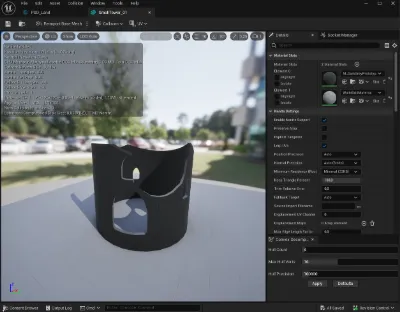
Example of a mesh created with simple shapes and boolean to extrude.
Teaching the Mechanics
The first version of the tutorial introduces two key actions: Movement and Jumping – essential for navigation and platforming. Shooting modes – one for interacting with crystals, and another for modifying the placement of certain elements in the environment. Activated crystals influence the environment, unlocking doors or altering the layout of platforms. Switchables objects are used to generate interactive platforming phases where the player must adjust their path based on obstacles.
Implementation of Visual Feedback
To make these interactions clear and intuitive, I integrated several feedback elements that I had created for the Proof of Concept (PoC):
Different materials to help the game understand the role of the various elements while waiting for unique meshes. Visual Indicators – The number of crystals required is displayed on each door. State Changes – Crystals and doors change color to signal their activation. Shooting Effects – Each shot has a distinct shooting effect and impact effect. Animations and Camera – When a door opens, an animation and camera shift reinforce the player’s understanding of successfully solving a puzzle. etc…
Subsequently, the VFX were enhanced by my colleague Olivier.
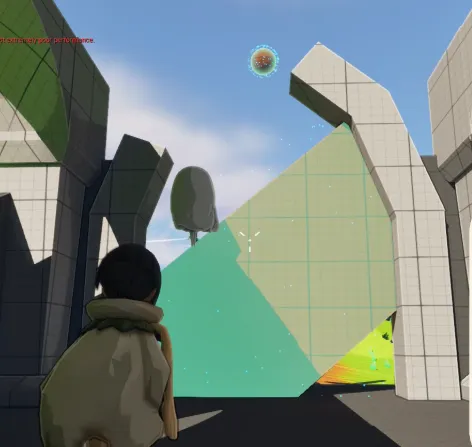
moment when the player learns how to switch items.
Integration of Foliage
In the design of the FTUE, I quickly implemented foliage to guide the visual direction of the project. This was a crucial step to help other departments, such as game art and audio, better visualize the environment compared to the simple greybox stage.
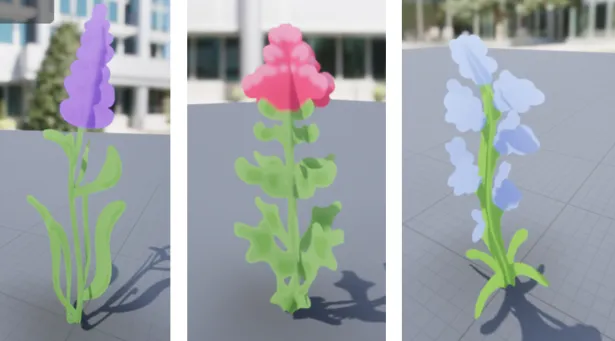
Some example of Foliages
This process included: Creation of Textures – Ensuring the cozy style was maintained throughout the environment. Wind Effect – Implementing a wind effect in the material, with weight painting applied to the mesh for dynamic movement. Use of Unreal Engine’s Foliage System – Leveraging Unreal Engine’s built-in foliage system to directly paint foliage onto the Landscape. This allowed for a more immersive environment.
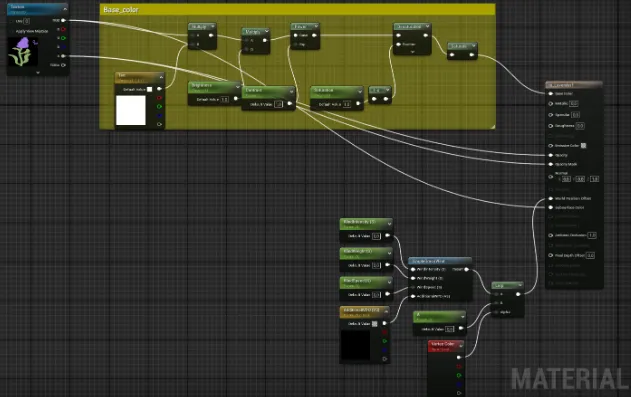
Material for the wind effect.
By setting all of this up, all that’s left for me to do is use Unreal’s built-in foliage tools to brush each blade of grass according to the rules defined in the Unreal Editor.
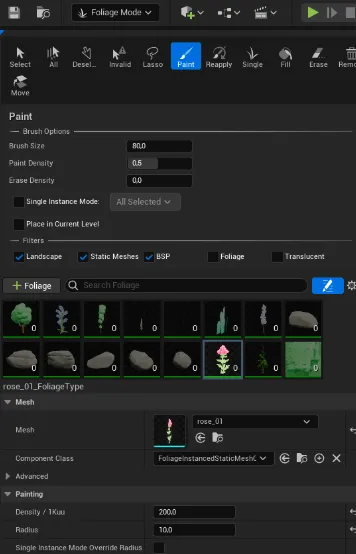
Foliage tool in Unreal editor
Design of a UI for better understanding
Panel and Font:
The game’s mechanics being relatively complex, I decided to integrate a UI panel providing visual and textual indications to guide the player. This panel displays: A description of the action to perform. The associated inputs to better understand how to execute it. A short explanatory video, allowing a more intuitive understanding of the mechanics. In order to maintain the cozy and accessible atmosphere of the game, I opted for a minimalist interface design with warm and welcoming colors. My UI placeholders were created with this goal in mind, integrating various effects to improve readability and visual appeal. For typography, I used Unreal Engine’s Text Style Set (TSS). This system allows the creation and storage of reusable text styles, making it easier to manage font effects (size, color, shading, outlines, etc.). With this approach, I was able to quickly implement text effects while maintaining visual consistency across the game. I also used TSS for custom icons to improve the clarity of the information. For example: Crystals are no longer mentioned in full text but represented by a visual symbol:
Active Crystal →

Inactive Crystal →

These icons facilitate understanding by being faster to identify than simple text.
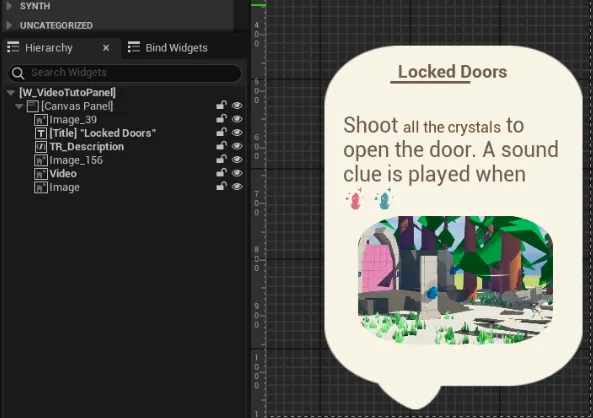
The panel widget blueprint hierarchy
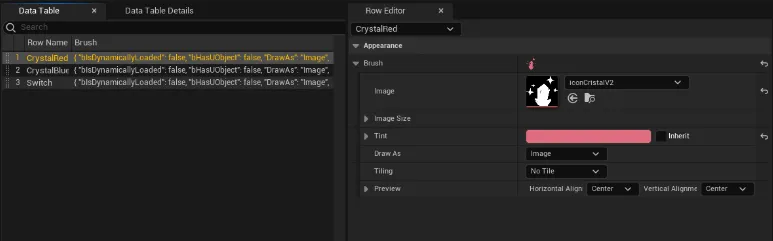
Example of a data table for Rich Text Style, here for the crystal icons.
Integration of Videos:
To accompany the textual descriptions, I integrated explanatory videos. Unreal Engine makes it easy to display videos through its Media Player system, which plays a dynamic texture directly applied to the UI using an image widget.
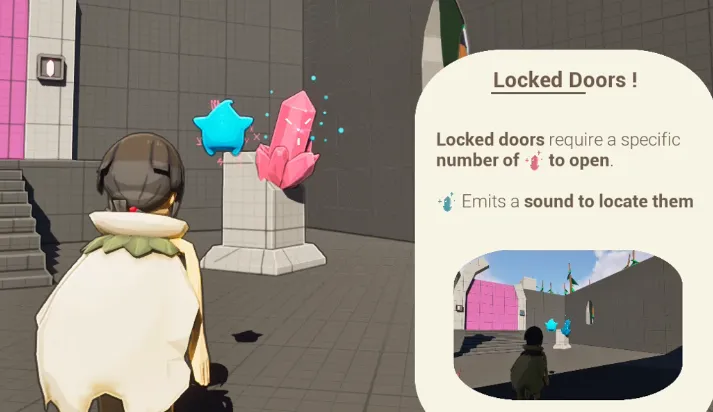
Example of UI when the player learns that they must shoot crystals to unlock doors.
Revisions of the FTUE to Adapt to the Story
The first version of the FTUE was created quickly, within a 2-3 week timeframe, to allow players to understand the core mechanics of Ruby and the Lost Crystals. However, as the game’s story evolved, it became necessary to rethink certain parts of the introduction. We decided to make a key character, Sapphire, inaccessible from the start, which impacted the tutorial’s progression.
Instead of introducing all abilities right away, the FTUE was modified to focus on teaching Ruby-specific mechanics first. Players learn to move, jump, push cubes, and use capstans, actions that are unique to Ruby in the early stages of the game. This decision aligned the mechanics’ learning process with the character while maintaining narrative consistency.
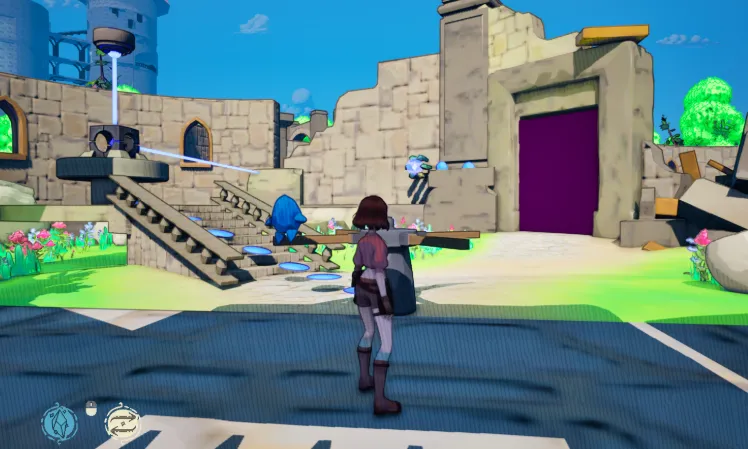
First room of the game where the player must turn a capstan to progress.
The Discovery of Sapphire and their mechanics
After mastering the fundamental mechanics, Ruby finds herself in a situation where she can no longer progress without additional powers. This is when the player discovers Sapphire, a key moment in the game where the transition between Ruby’s mechanics and the duo’s abilities becomes evident. Sapphire grants Ruby access to shooting powers, a crucial mechanic for interacting with crystals and modifying the environment.
This new phase marks a return to elements from the original FTUE but with a significant addition: the tutorial now continues with the introduction of shooting and interactions with crystals. The shooting mechanic opens up new possibilities for puzzle-solving, allowing the player to reuse previously learned skills in a logical sequence, making the experience smoother and more engaging.
First room of the game where the player needs sapphire power to progress.
Improvements and Adjustments
After this revision, the FTUE was redesigned to offer a learning curve that better aligns with the game’s story. Gameplay mechanics were introduced sequentially, based on in-game events, reinforcing player immersion and motivation. The tutorial became an integral part of the narrative, allowing players to feel like they were progressing both in their understanding of mechanics and in the development of the relationship between Ruby and Sapphire.
Adding Dialogue Elements and Visual Cues
To make the experience even more intuitive and immersive, I added dialogue elements that provide guidance to players during the FTUE. These dialogues were designed to help players understand gameplay mechanics while immersing them in the story and character dynamics.
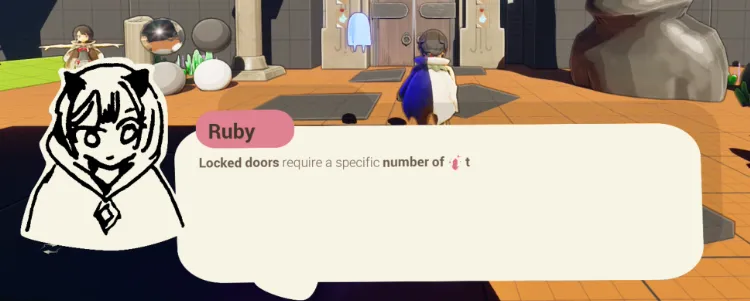
Placeholder look of the dialogue system.
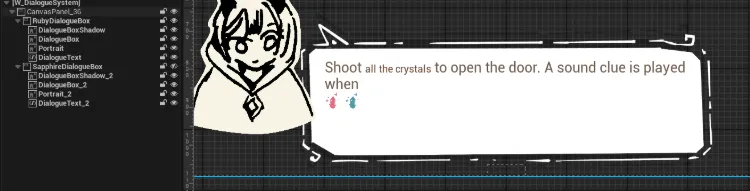
Widget Blueprint hierarchy
I developed the dialogue system using trigger boxes that, when activated, generate a special dialogue UI. This creates interactive moments where players can discover essential information or receive hints to progress.
The text in dialogues utilizes the Text Style Set (TSS) system to vary word appearance, using bold, italics, or even animations like the wave effect. A key element of this system was the typewriter animation, where text appears letter by letter, creating a dynamic and engaging effect for the player.
Dialogue also appears and disappears with a cool fade in-out effect.
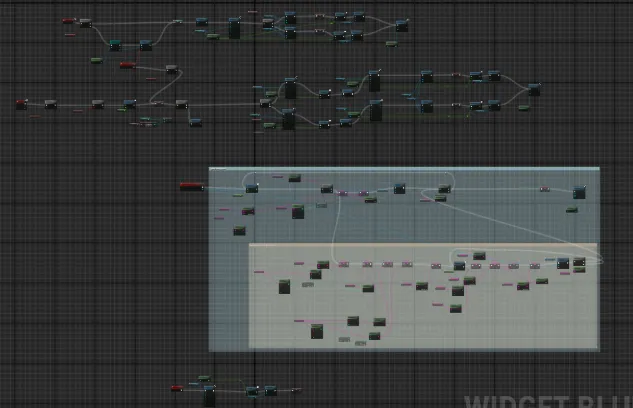
Event graph for the dialogue system the blue block is for the typewriting effect.
The addition of interactive dialogues serves as a gimmick not only to guide players in learning the mechanics but also to enhance immersion in the story. By linking dialogues to specific gameplay events, players can feel more connected to the characters by discovering their unique and distinct personalities while also receiving useful hints to progress.
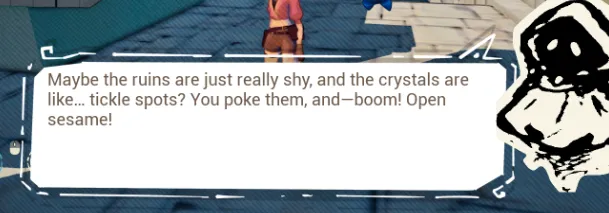
Example of a purely narrative dialogue.
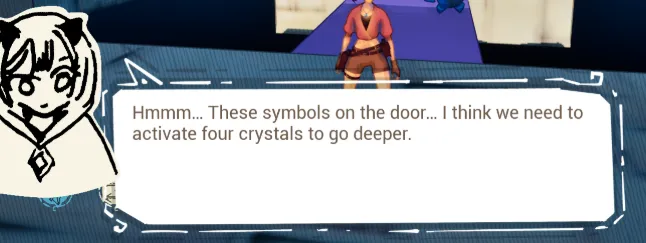
Example of a dialogue that gives a hint to the player
Conclusion
Designing an effective First-Time User Experience (FTUE) for Ruby and the Lost Crystals was a complex but rewarding challenge. By leveraging progressive learning, visual feedback, and interactive dialogues, I was able to create an introduction that smoothly integrates gameplay mechanics with the game’s narrative and atmosphere. The iterative design process starting from the Proof of Concept (PoC), refining mechanics based on playtests, and adapting to story evolutions allowed me to craft an engaging tutorial that feels natural and immersive. Using Unreal Engine’s tools, such as the Landscape system, Modeling Tools, and Foliage, also helped in shaping a visually intuitive and rewarding learning environment.
The final FTUE not only teaches players the necessary mechanics but also enhances their connection with Ruby and Sapphire. By progressively unlocking abilities and integrating guidance through dialogues, players experience a seamless transition from learning to mastery while staying immersed in the game’s world.
Thank you for reading my blog post.